



Interactive demo with sample data

KERNEL demo: the recommendation comes with its facts, a person decides

Pick a source and see which records feed the recommendation; open the decision card, choose an option and approve or hold it. All data is sample data and stays in your browser.

Back to the KERNEL product page

What in this demo is product, what is example?

Product What KERNEL can do

  • One data pool from the connected applications; transfer status and last data time per source
  • Data quality per source: matched tables, reliable records, records held by quality checks
  • Automatic refresh of the sources every 30 minutes
  • A status summary and to-do list with the facts behind them (the recommendation)
  • Decision cards awaiting approval, monitoring and outcome tracking; a person decides

Not shown in this demo: How the recommendation is produced, answers on the Ask screen, anomaly detection and forecasting, recalculation of a recommendation when a condition changes, and automatic hand-off of a decision to another application. We clarify these in writing during discovery.

KERNEL

Sample Lighting Plant sample tenant

Friday 11:40 (sample time) · Sources refresh automatically every 30 minutes

Data · connected sources Product capability

Pick a source: the recommendation is filtered to the facts that come from it.

Recommendations Example recommendation

Recommendation · high priority · Awaiting approval

IE-1042: the 13:00 truck leaves 2 hours before the expected quality release

With this plan the lot cannot be loaded on the Friday 13:00 truck; the Friday delivery promised to the customer is at risk. The decision is needed before 13:00 (1 h 20 min left).

Facts behind it

Facts shown: 5 of 5 · all sources

  • OPAS · Production record Sample work order IE-1042 · 24 luminaires · production completed Thursday 17:00
  • OPAS · Quality hold record Lot on quality hold · release expected Friday 15:00
  • QDMS · Published instruction Final inspection instruction: a lot without quality release is not loaded (published, version 1.0)
  • B2B · Order (dealer channel) Order “Approved” · delivery promised for Friday source delayed: may be out of date
  • B2B · Dispatch plan Truck booked to leave Friday 13:00 source delayed: may be out of date

To do (for people)

  1. Put the decision card to the operations director for approval
  2. Confirm the release time with quality
  3. Ask logistics whether a 16:00 truck is available
Friday timeline
Friday timeline Friday axis 11:00–18:00. Now 11:40. The truck leaves at 13:00. Quality release is expected at 15:00 and may come as late as 16:30. The truck leaves 2 hours before release. 11 12 13 14 15 16 17 18
  • Now 11:40
  • Truck 13:00 (plan)
  • Expected release 15:00
  • Release window 15:00–16:30

Decisions Product capability

  • IE-1042 Friday shipment

    Decides: Operations director · before the 13:00 truck leaves

    Awaiting approval

In this demo, approval only changes the card’s status and record. KERNEL does not change the truck time, does not write to source records and does not open a task in another application.

Awaiting approval · sample data

Decision card · IE-1042 Friday shipment

KERNEL suggests; a person decides.

Facts behind it

  • OPAS · Production record Sample work order IE-1042 · 24 luminaires · production completed Thursday 17:00
  • OPAS · Quality hold record Lot on quality hold · release expected Friday 15:00
  • QDMS · Published instruction Final inspection instruction: a lot without quality release is not loaded (published, version 1.0)
  • B2B · Order (dealer channel) Order “Approved” · delivery promised for Friday source delayed: may be out of date
  • B2B · Dispatch plan Truck booked to leave Friday 13:00 source delayed: may be out of date

Assumptions

  • Quality release comes on Friday at 15:00; this is an expectation and may slip to 16:30.
  • An unreleased lot is not loaded (the published final inspection instruction).
  • A 16:00 truck can be found; logistics has not confirmed it yet.
  • B2B data arrived 52 minutes ago (delayed); the dispatch plan may have changed since.
Options · Choose an option

The options are not a ranking computed by KERNEL.

Who decides

Operations director · Before the 13:00 truck leaves

In this demo, approval only changes the card’s status and record. KERNEL does not change the truck time, does not write to source records and does not open a task in another application.

Real product screen

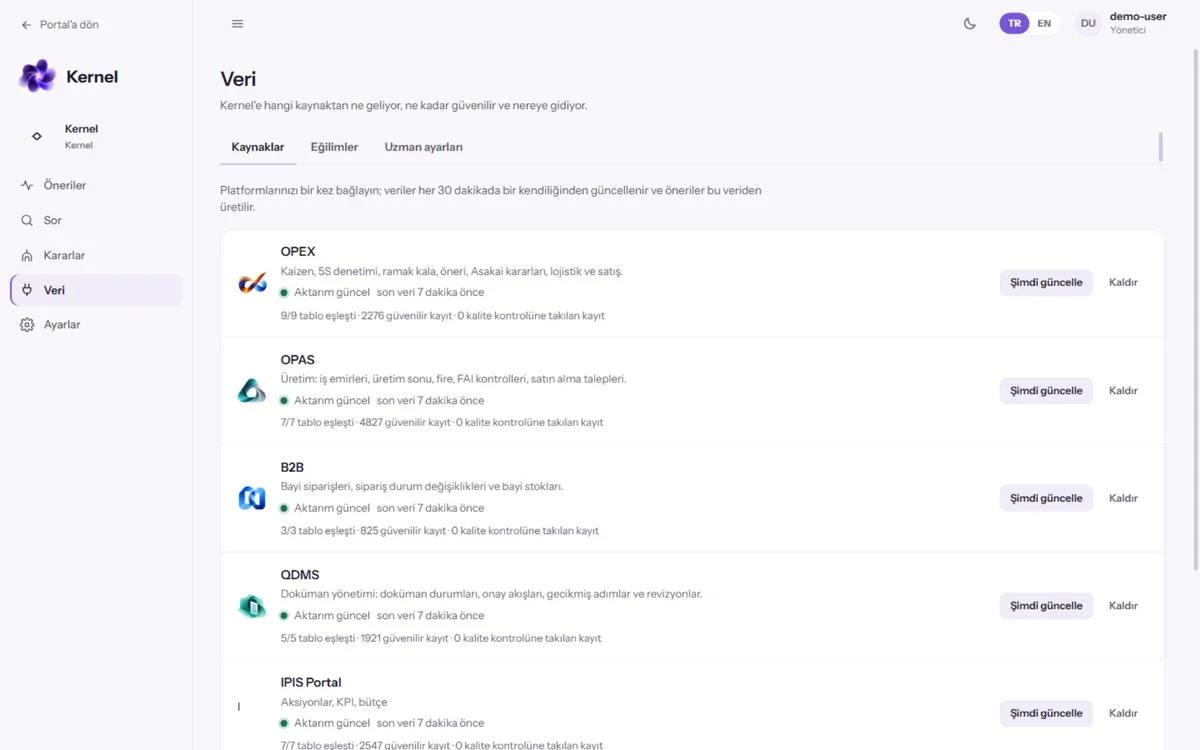
The Data section of this demo shows what the KERNEL Data screen shows: connected sources, transfer status, matched tables and reliable record counts.

KERNEL data screen listing connected application sources and transfer status
KERNEL data view (Veri): connected sources (OPEX, OPAS, B2B, QDMS), transfer status, matched tables and reliable record counts (demo environment, sample data)

Original capture

KERNEL data screen listing connected application sources and transfer status

Product screen · sample data

KERNEL data view (Veri): connected sources (OPEX, OPAS, B2B, QDMS), transfer status, matched tables and reliable record counts (demo environment, sample data)

At actual size you can scroll to inspect the image. Original size: 2000 × 1095 pixels.